Modern applications increasingly depend on more than a single AI model. They call cloud and local LLMs, connect agents to MCP tool servers, and hand work from one agent to another. As that environment grows, the risks pile up: provider keys get scattered across applications, unsafe or adversarial prompts and sensitive data flow through with no guardrails, costs become hard to control, policy is applied inconsistently, and teams lose visibility into how AI is actually being used. Security stops being a feature you can bolt on later and becomes something every request needs to pass through.
An AI gateway places one control plane in front of all of it. The HostAnywhere AI Gateway gives applications an OpenAI-compatible endpoint for models, a governed endpoint for MCP tools, and a protected path for agent-to-agent communication. From one dashboard you manage credentials, route requests between local and cloud services, apply guardrails, enforce spend limits, cache repeated responses, and monitor usage.
This guide explains how each part works and how the pieces fit together — whether you're connecting your first application or governing AI usage across a team.
1. What an AI gateway is
An AI gateway is a server that sits between your applications and the AI they use. Instead of each app calling OpenAI, Anthropic, a local model, or a tool server directly, every request goes through the gateway. That single position on the network lets it do things no individual app can do well on its own:
- Keep secrets off clients. Provider API keys live in the gateway, never in your app code, mobile builds, or browser bundles. Apps authenticate to the gateway; the gateway authenticates to the providers.
- Control where requests go. Send a request to a cheap model by default and a stronger one for hard tasks, fall back automatically when a provider is down, and change all of that without redeploying an app.
- Enforce security and policy. Screen every prompt, tool call, and response through the same guardrails — content safety, PII redaction, and prompt-injection detection — and apply the same spending limits and access rules to every request, regardless of which app made it.
- Understand usage without logging prompt content. Track requests, tokens, cost, latency, errors, cache performance, and guardrail activity — while keeping the content of prompts and responses out of the logs.
The HostAnywhere AI Gateway speaks the OpenAI-compatible API, so most existing code and SDKs work by changing only the base URL and the API key. But it governs more than language models — it covers three kinds of AI traffic, which we'll get to in section 3.
2. Three ways teams use it
Before the details, three concrete shapes this takes in practice:
- Local-first application. Send requests to a model running on your own device, and fall back to a cloud model automatically when the local one is busy or unavailable — without the app knowing the difference.
- Multi-provider SaaS. Keep every provider credential out of application code, spread traffic across OpenAI, Anthropic, and others, and enforce one organization-wide budget so no service can run up a surprise bill.
- Agent platform. Give agents access to an approved set of MCP tools and other agents through scoped keys, with guardrails applied centrally so every tool call and message is checked the same way.
3. One control plane, three gateways
"AI" isn't one thing anymore. A production AI stack may involve three distinct kinds of traffic, and the gateway has a boundary for each:
| Gateway | Endpoint | What flows through it |
|---|---|---|
| LLM Gateway | /v1 | Chat completions and embeddings — the model calls your app makes. |
| MCP Gateway | /mcp | Model Context Protocol tool calls — the tools an AI can invoke. |
| A2A Gateway | /a2a | Agent-to-Agent messages — one autonomous agent handing work to another. |
The important idea is the shared control plane: all three gateways draw on the same providers, the same API keys, the same guardrails, the same spend limits, and the same observability. You configure those once, and they apply across every kind of AI traffic. The rest of this guide covers those shared building blocks — but first, where the gateway runs.
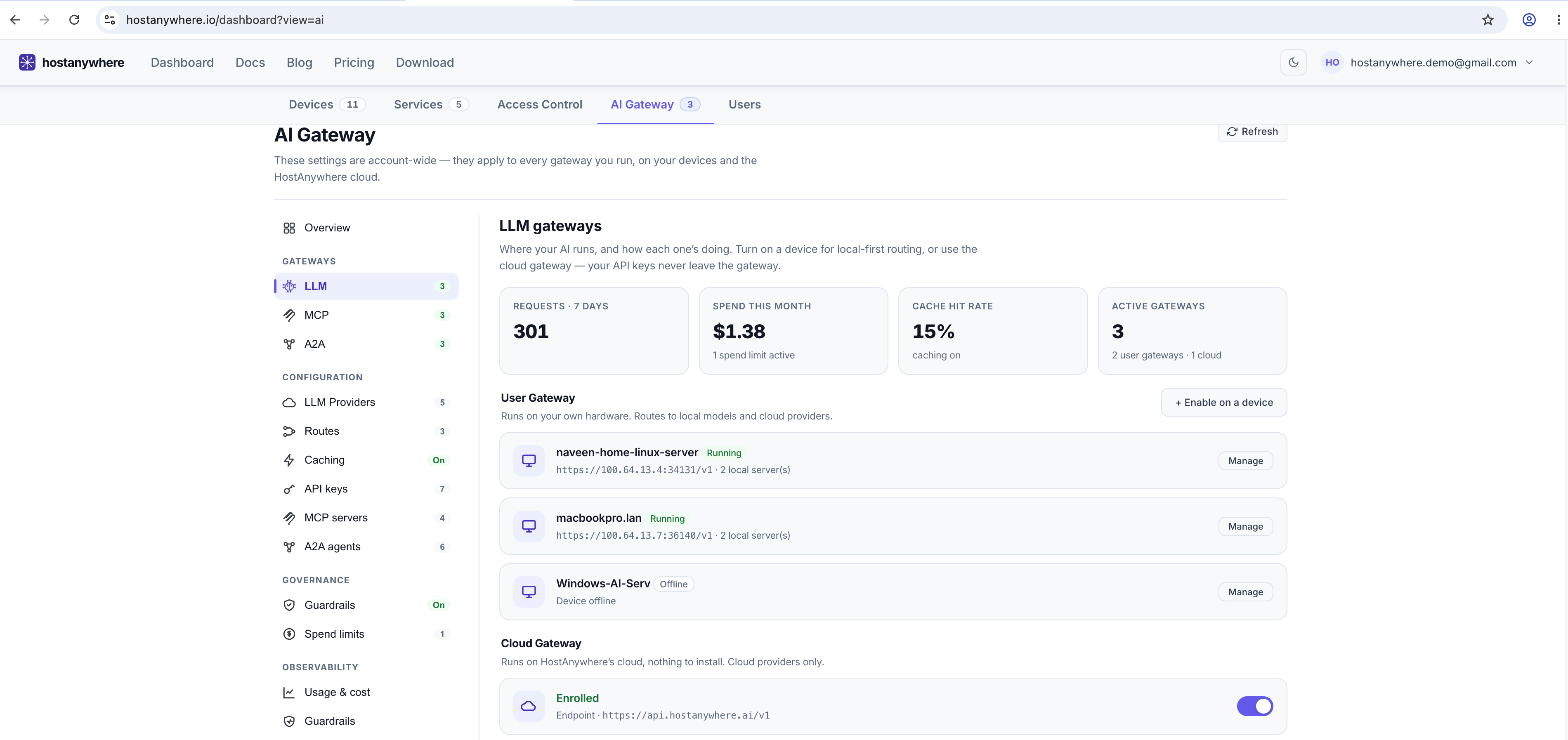
The LLM Gateway
This is the one most people picture. It exposes an OpenAI-compatible surface — /v1/chat/completions, /v1/embeddings, /v1/models — so any OpenAI SDK or tool can point at it. Your app sends a normal chat request; the gateway decides which real model serves it, injects the provider key, applies guardrails, and records usage. Streaming responses are supported.
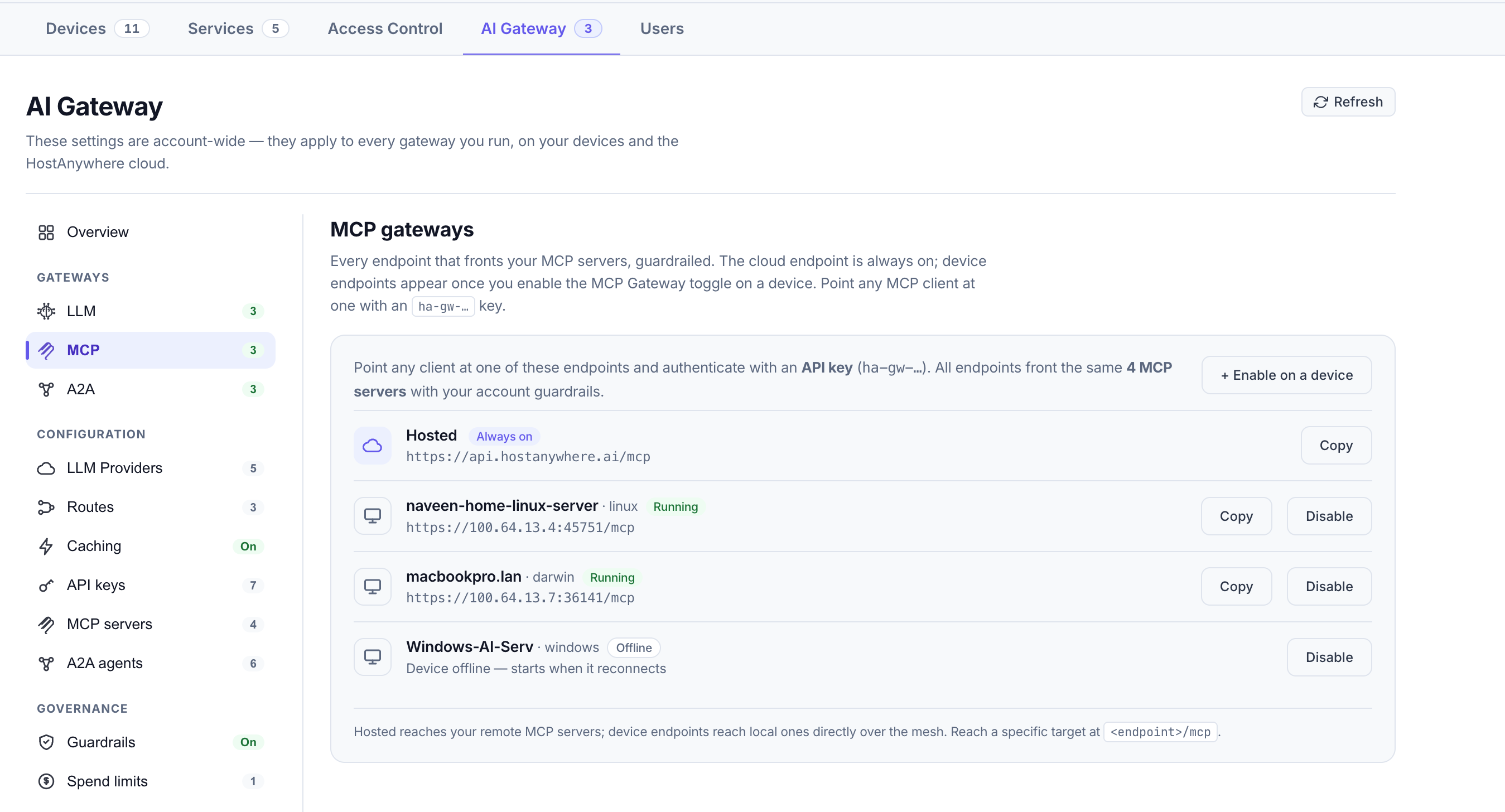
The MCP Gateway
The Model Context Protocol (MCP) is the emerging standard for giving an AI access to tools — file systems, databases, search, internal APIs. An MCP server exposes tools; an AI client lists and calls them. The MCP Gateway puts one endpoint in front of all your MCP servers: it aggregates their tools into a single list, forwards each call to the right server, injects any credentials that server needs, and runs guardrails over the tool arguments going in and the results coming back.
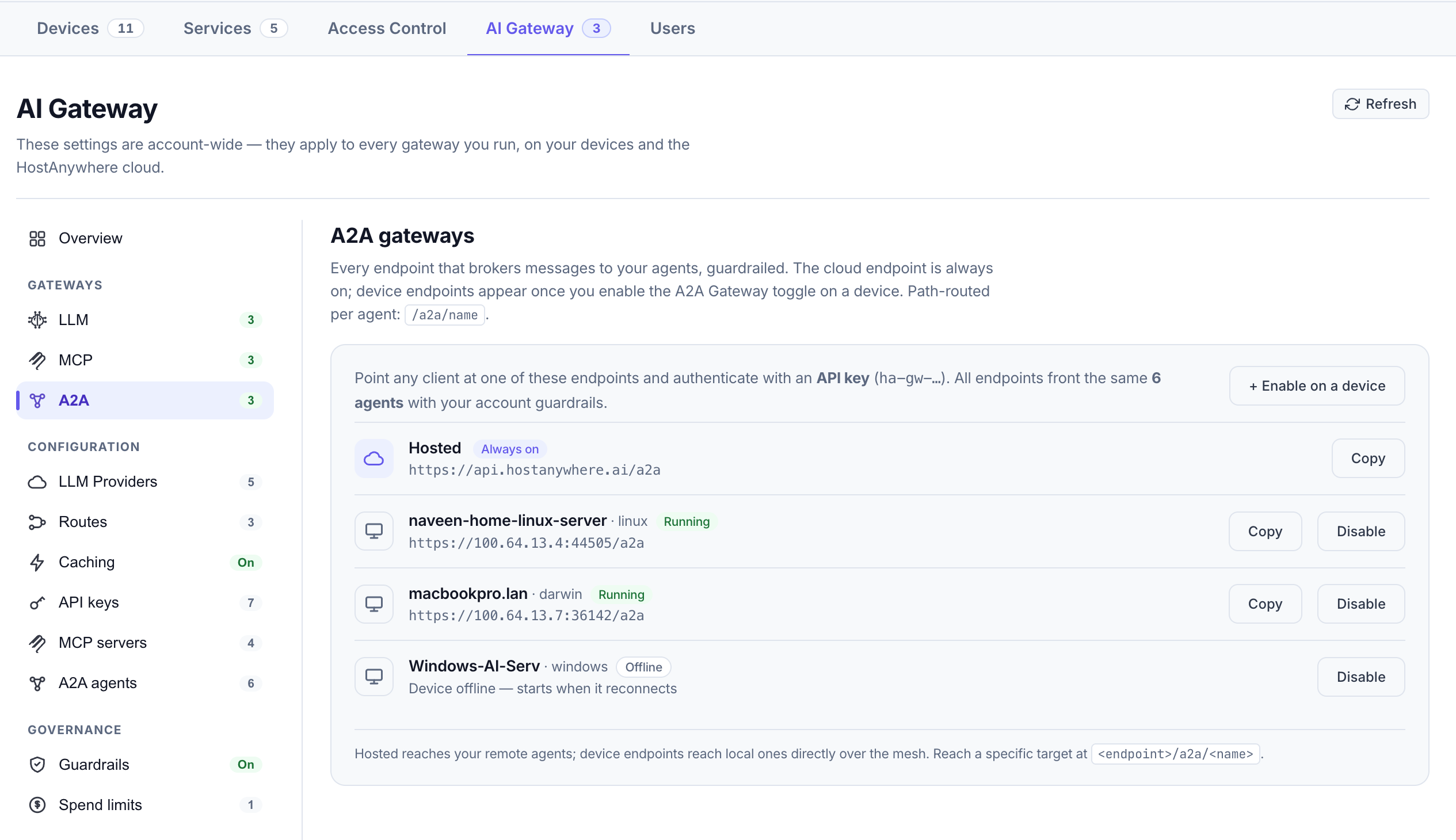
The A2A Gateway
As agents start delegating to each other, Agent-to-Agent (A2A) traffic becomes its own category: one agent sending a task to another agent's endpoint. The A2A Gateway places a governed endpoint in front of your registered agents, forwards messages to the appropriate agent, injects its credentials, and applies guardrails before delivery.
4. Run it hosted, on your own hardware, or both
This is where the HostAnywhere AI Gateway differs from cloud-only gateways: configuration is account-wide, but execution is flexible. The same providers, routes, keys, and policies can run in any of three places:
- The managed hosted gateway at
api.hostanywhere.ai— no agent or local installation required. Enable it from the AI Gateway dashboard, add a provider, create a key, and start making calls. This is the fastest way to a working gateway. - A gateway on your own device — the HostAnywhere agent can run the LLM, MCP, and A2A gateways directly on hardware you own. Combined with an AI Server (open models running on your own machine), a request and the model that answers it can stay entirely on infrastructure you control.
- Both, together — run the hosted gateway for cloud providers and route to a private model on your device when a request should stay in-house. The hosted gateway reaches your device's local services over the HostAnywhere agent's secure tunnel, so "use my local model" works from anywhere without exposing that machine to the internet.
Choose the managed gateway for immediate setup, a device gateway for local-first processing, or both. Once an application points to a gateway, you can change its route between local and cloud targets without redeploying the application.
5. LLM Providers
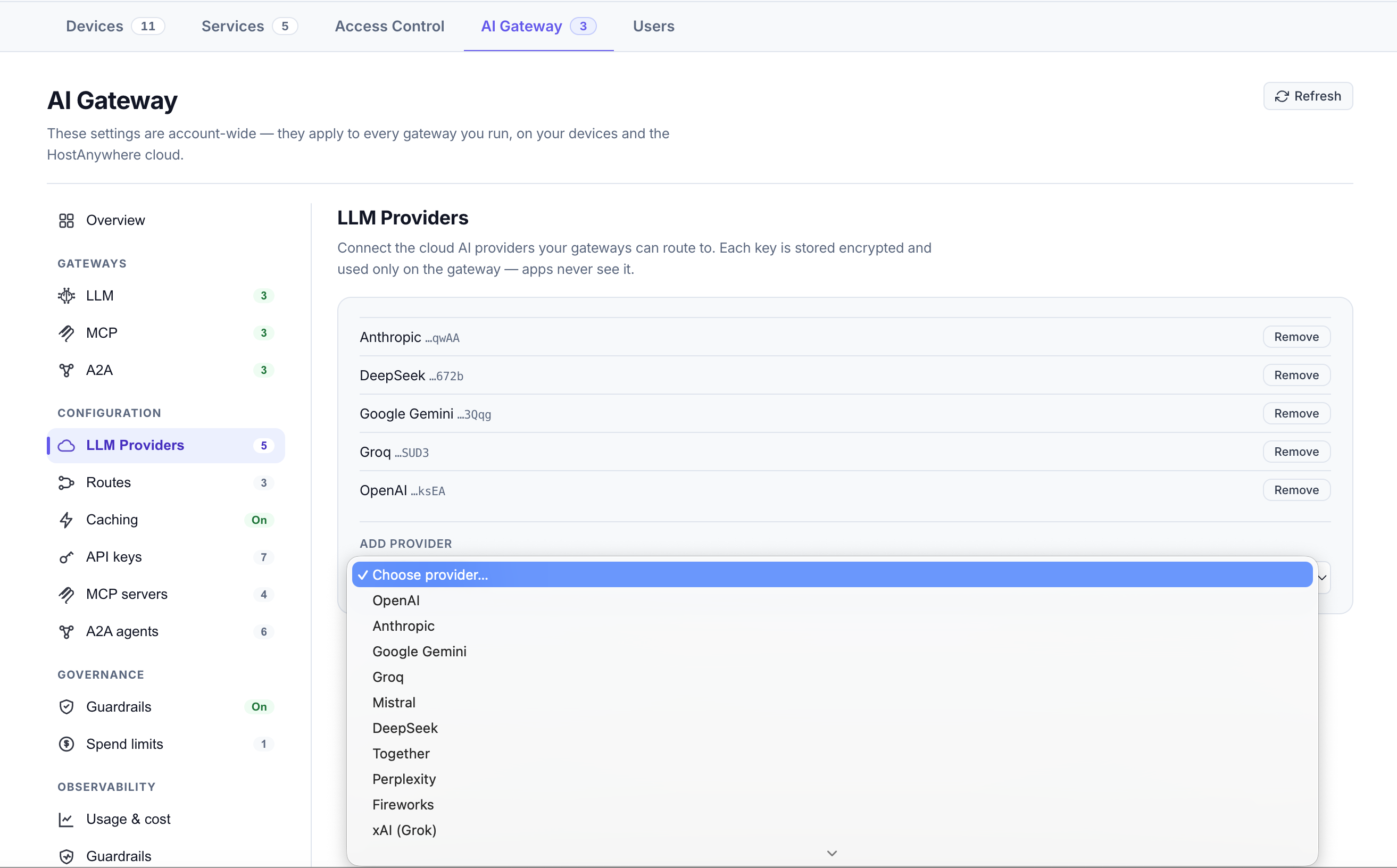
A provider is an upstream AI service you connect to the gateway. Connect leading providers — including OpenAI, Anthropic, Gemini, Azure OpenAI, AWS Bedrock, Mistral, Groq, and DeepSeek, among others — or route to models running on your own HostAnywhere AI Servers. (The documentation keeps the current list.) You add a provider once by pasting its credentials.
Two things matter about how the gateway handles provider keys:
- They're encrypted at rest. Keys are stored in an encrypted vault, not in plain text.
- They're injected server-side. When a request is routed to a provider, the gateway attaches the credential at the moment of the outbound call. Your applications never see it. This is the single biggest security win of a gateway: a leaked app build or a compromised browser bundle can't leak a provider key that was never there.
Because providers are decoupled from apps, you can rotate a key, swap Anthropic for Bedrock, or add a new provider centrally — and every app benefits immediately, with no redeploys.
6. Routes
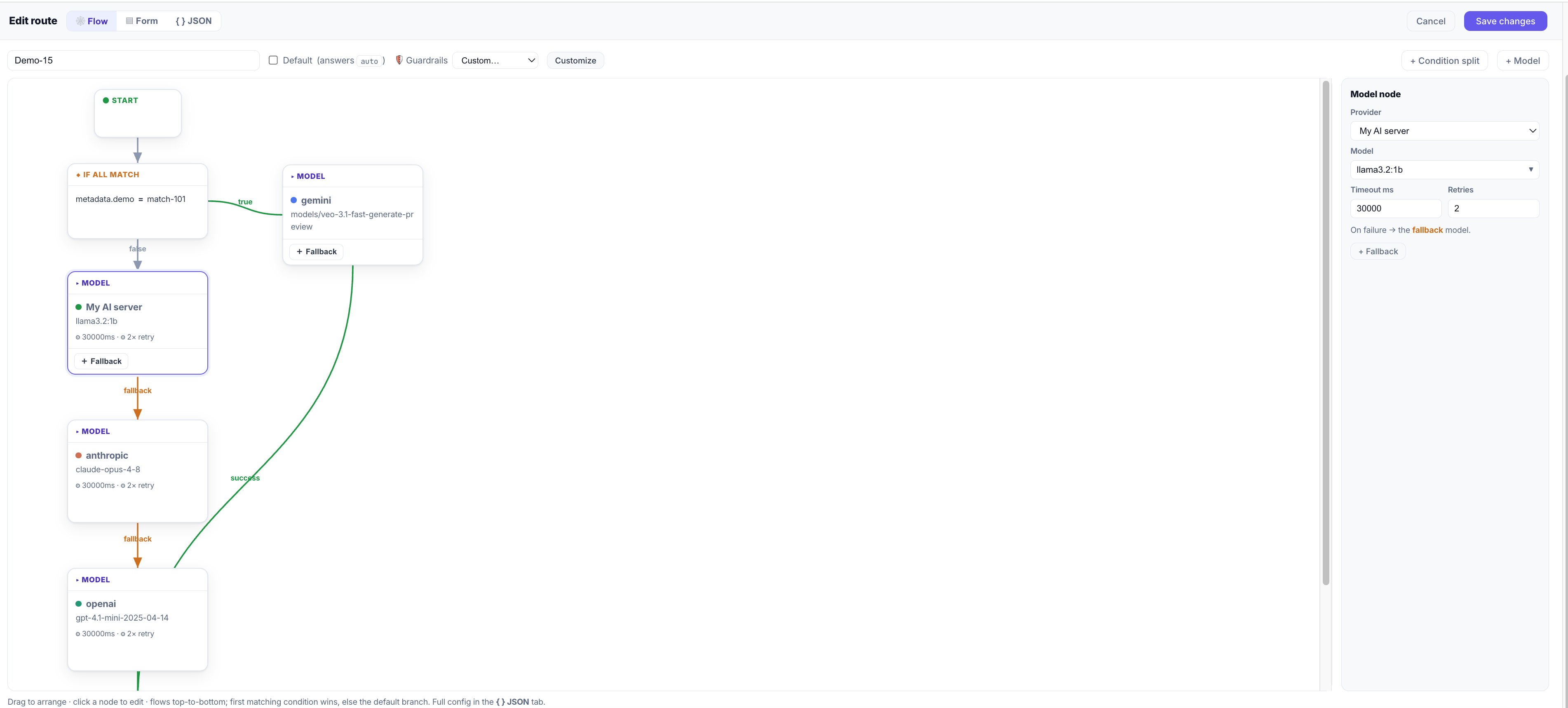
A route is a named, virtual model. Instead of hardcoding gpt-4o in your app, you point the app at a route like fast or reasoning, and the route decides which real model (or models) actually serve the request. This indirection is where a lot of the gateway's power lives.
Failover chains
A route holds an ordered list of targets — for example, "try my local model first, then fall back to OpenAI, then Anthropic." If a target errors or times out, the gateway retries it according to that target's reliability settings; if it still fails, it automatically moves to the next target in the route — so a provider outage degrades gracefully instead of taking your app down.
Conditional (attribute-based) routing
Routes can also branch on attributes of the request rather than just falling through a fixed list. You can route by things like prompt size, whether an image is attached, a header your app sets, the end-user identifier, the requested model name, or custom metadata — using operators such as greater-than, equals, contains, and in. A common pattern: send short prompts to a small, cheap model and long or image-bearing prompts to a larger one.
Privacy note: conditional routing looks only at request metadata — sizes, headers, model names, flags — never at the content of the prompt itself.
The default route
One route is the default, reachable under the reserved name auto. If a client asks for auto (or you make a route the default), the gateway resolves it to that route's chain. Only the literal auto is remapped — asking for a specific model name still means that model.
Here's the whole point of routes in one example. The app never changes; the routing does:
curl https://api.hostanywhere.ai/v1/chat/completions \
  -H "Authorization: Bearer ha-gw-your-key" \
  -H "Content-Type: application/json" \
  -d '{
    "model": "auto",
    "messages": [{"role": "user", "content": "Summarize this ticket."}]
  }'
7. API keys
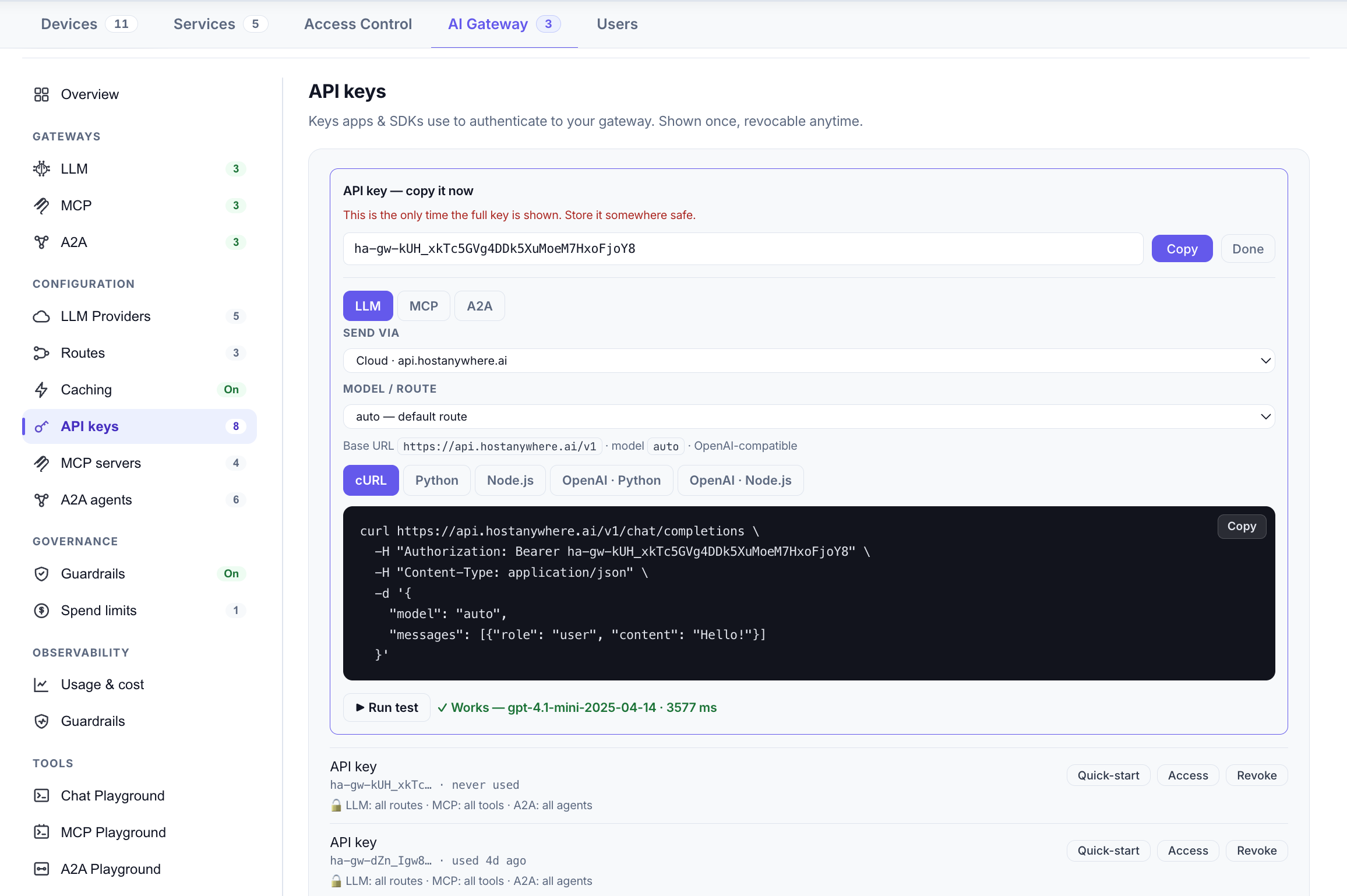
Applications authenticate to the gateway with a gateway API key — a token that starts with ha-gw-. This is deliberately separate from your provider keys: apps hold a gateway key, the gateway holds the provider keys, and the two never mix. Revoking a gateway key cuts off one app without touching any provider credential or any other app.
Gateway keys can be scoped. By default a key can reach everything, but you can restrict it to specific routes, providers, MCP tools, or A2A agents — so a third-party integration or a single microservice gets exactly what it needs and nothing else.
8. MCP servers
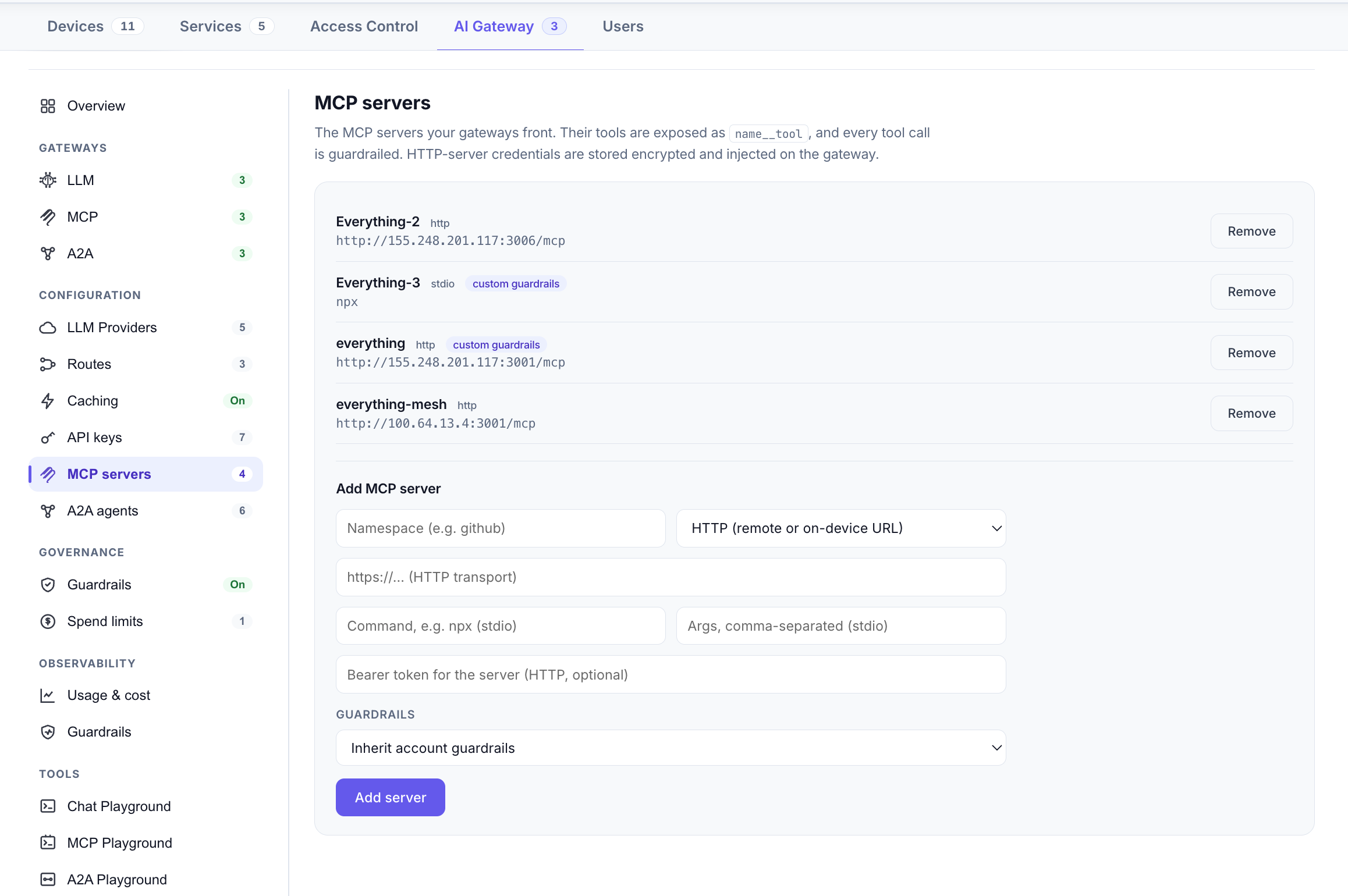
Under the MCP Gateway you register the MCP servers whose tools you want to expose. Each server is either:
- HTTP — a remote MCP server reachable over the network, or
- stdio — a local process the agent launches and talks to over standard input/output (for tools that run on a specific machine).
The gateway lists every server's tools under one tools/list call, namespacing each tool by its server (for example filesystem__read_file) so names never collide. It accepts JSON-RPC requests over HTTP, so a compatible MCP client can connect to one URL and see the combined tool list from all registered servers. When it calls one, the gateway routes the call to the owning server, runs guardrails over the arguments and the result, and returns it. You can turn individual servers on or off, and give a server its own guardrail policy.
9. A2A agents
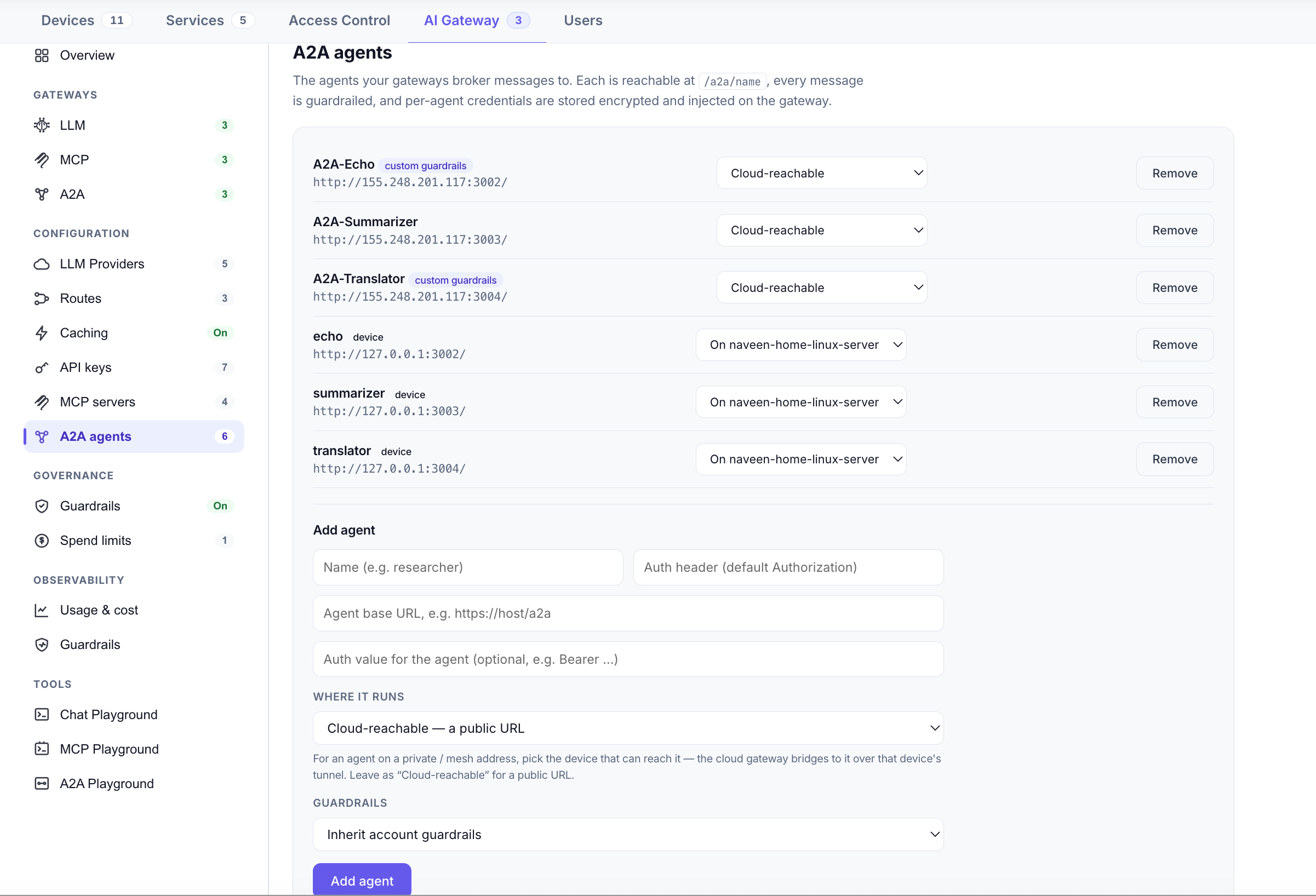
Under the A2A Gateway you register the agents you want to reach — each with its endpoint and, if needed, its authentication. The gateway exposes each registered agent at a stable path such as /a2a/<name> and forwards authenticated messages to the agent's configured endpoint. When one agent sends a task to another through the gateway (the protocol's message/send call), the gateway applies your guardrails to that message before it's delivered. Like keys and tools, agents can be included in a key's scope, so you control exactly which agents a given key may reach.
10. Guardrails
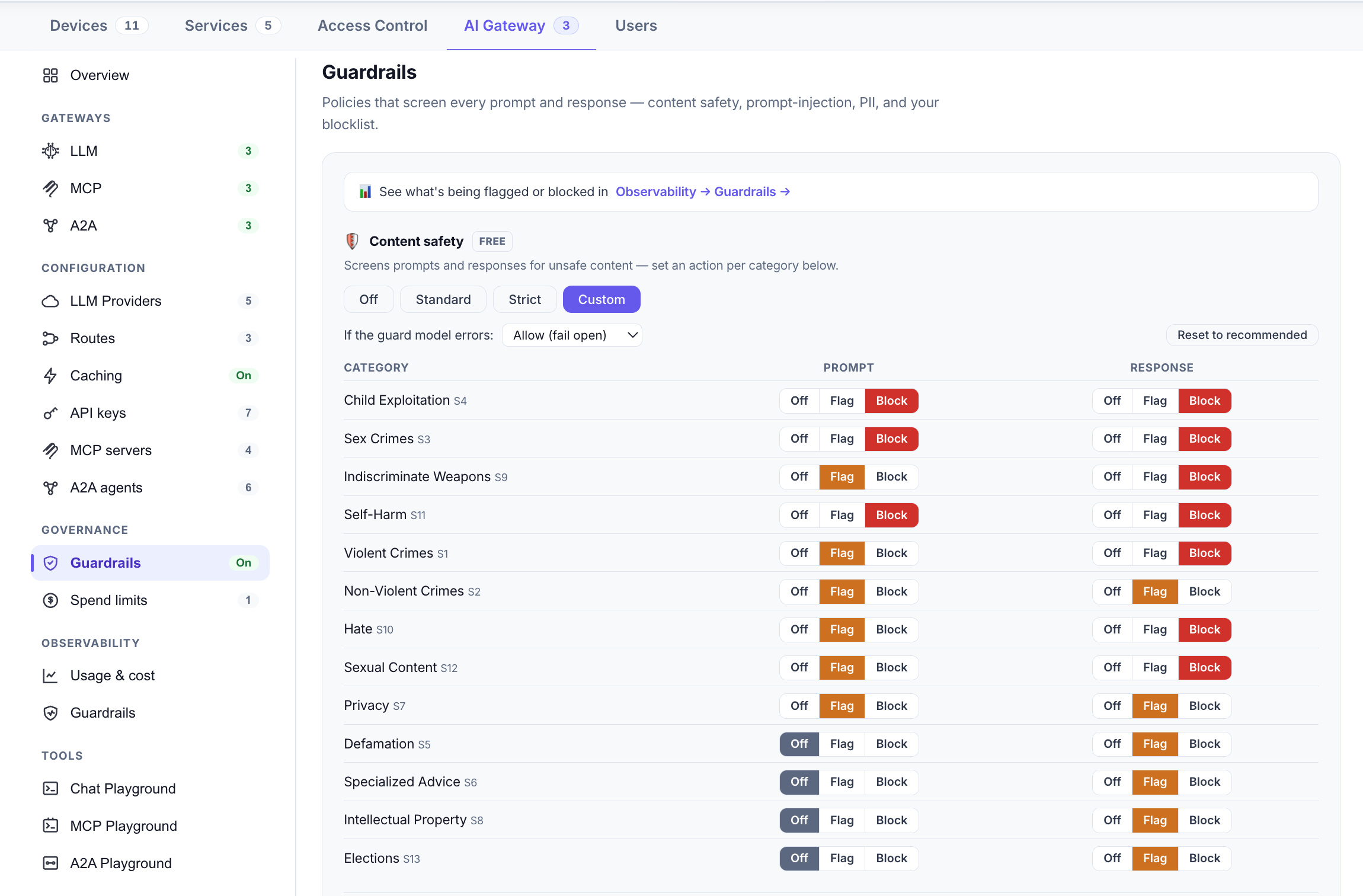
Guardrails are the safety and policy checks the gateway runs on AI traffic — the reason a gateway is more than a proxy. Depending on the policy and the kind of traffic, guardrails can inspect requests, responses, tool arguments, tool results, and agent messages. They fall into two buckets: deterministic checks that run locally and fast, and model-based checks that ask a small classifier model to judge the content.
| Layer | What it does | Availability |
|---|---|---|
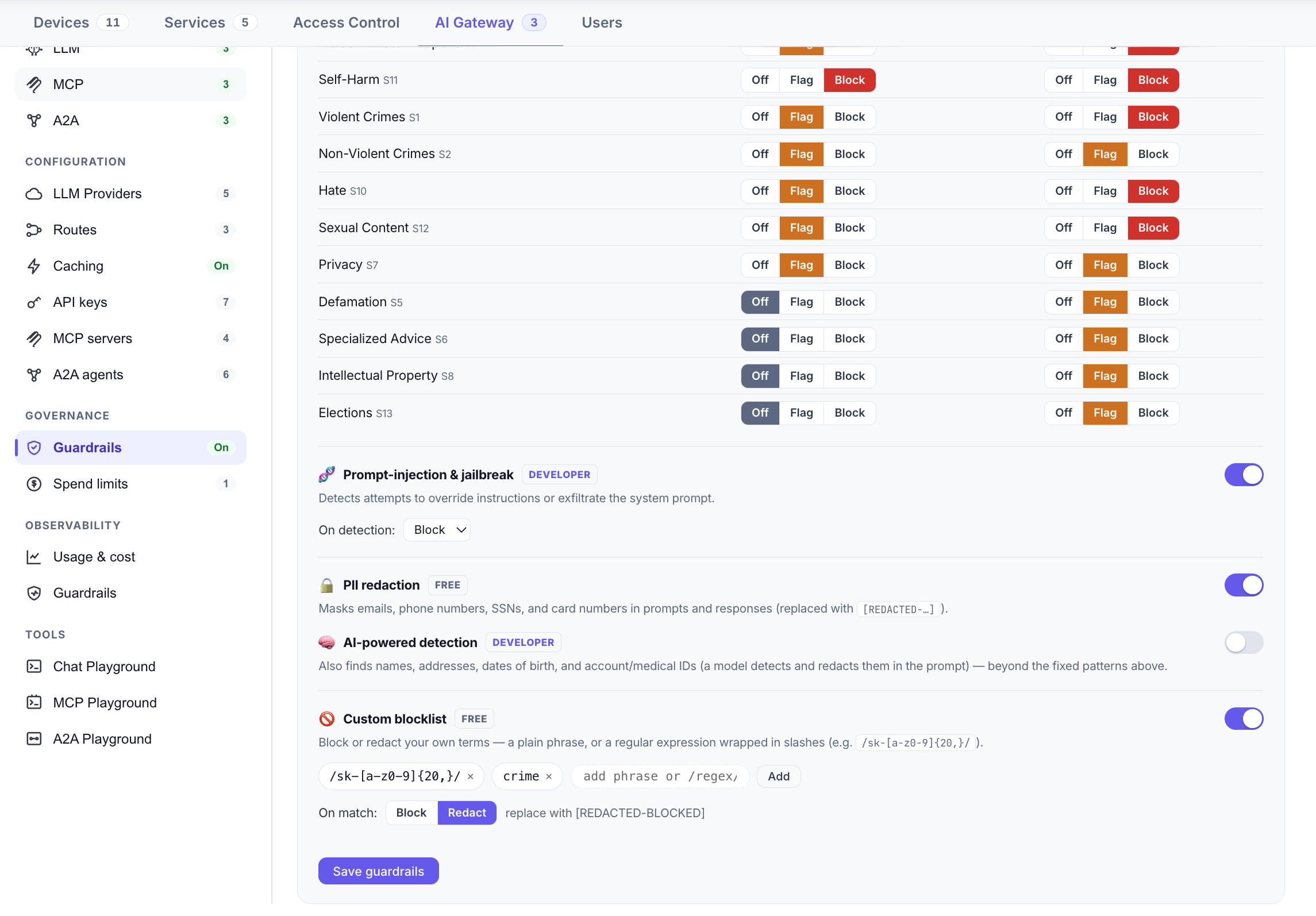
| Content safety | Flags or blocks unsafe content by category (hate, violence, self-harm, sexual content, and so on), with presets from Off to Strict, or a custom per-category policy. | Free on every plan |
| PII redaction | Detects common personal data (emails, phone numbers, card-like numbers) with pattern rules and redacts it. | Free on every plan |
| Custom blocklist | Your own list of terms or patterns to block or redact. | Free on every plan |
| Prompt-injection & jailbreak detection | A model-based check that catches attempts to override instructions or jailbreak the system. | Paid plans |
| AI-powered PII detection | A model-based check that finds personal data that pattern rules miss. | Paid plans |
Each category can typically be set to off, flag (allow but record), or block. Guardrails are designed to fail open within a short time budget: if a check can't complete quickly, the request proceeds rather than hanging, so safety tooling never becomes an availability risk. You can set a policy at the account level and override it per route, per MCP server, or per agent.
Worth being precise about pricing: content safety, pattern-based PII redaction, and the blocklist are free on every plan. Only the two model-based layers — prompt-injection detection and AI-powered PII detection — require a paid plan.
11. Spend limits
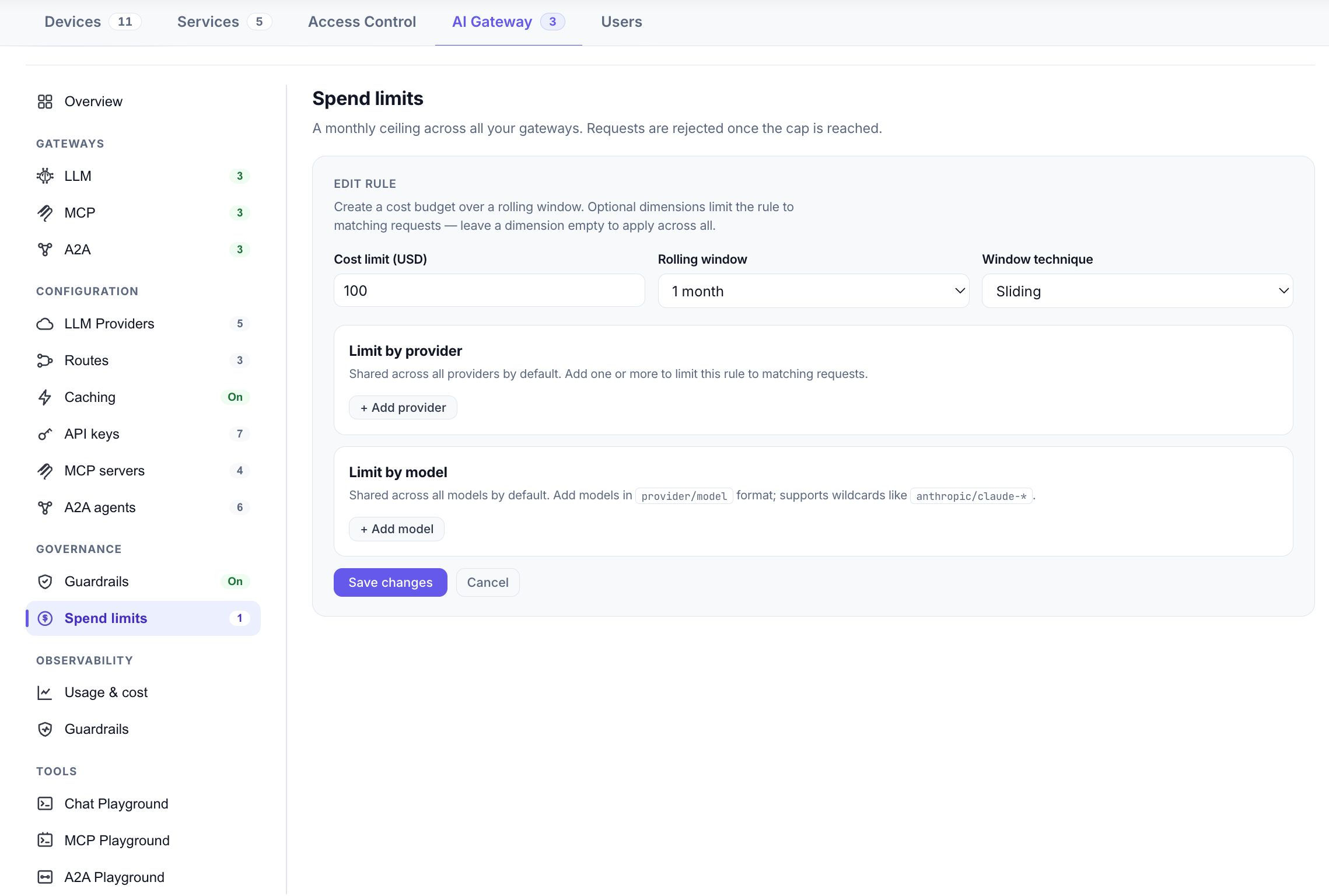
Spend limits put a hard ceiling on AI cost. A limit caps spend over a window you choose — an hour, a day, a week, or a month, as either a sliding or a fixed period — and it can be scoped to specific providers or models, or apply across everything. When a limit is reached, further matching requests are rejected until the applicable window resets.
This is the difference between discovering a runaway bill at the end of the month and simply having requests stop at the ceiling you set. Because limits are enforced at the gateway, they cover every app and every key at once — no app can bypass them.
12. Caching
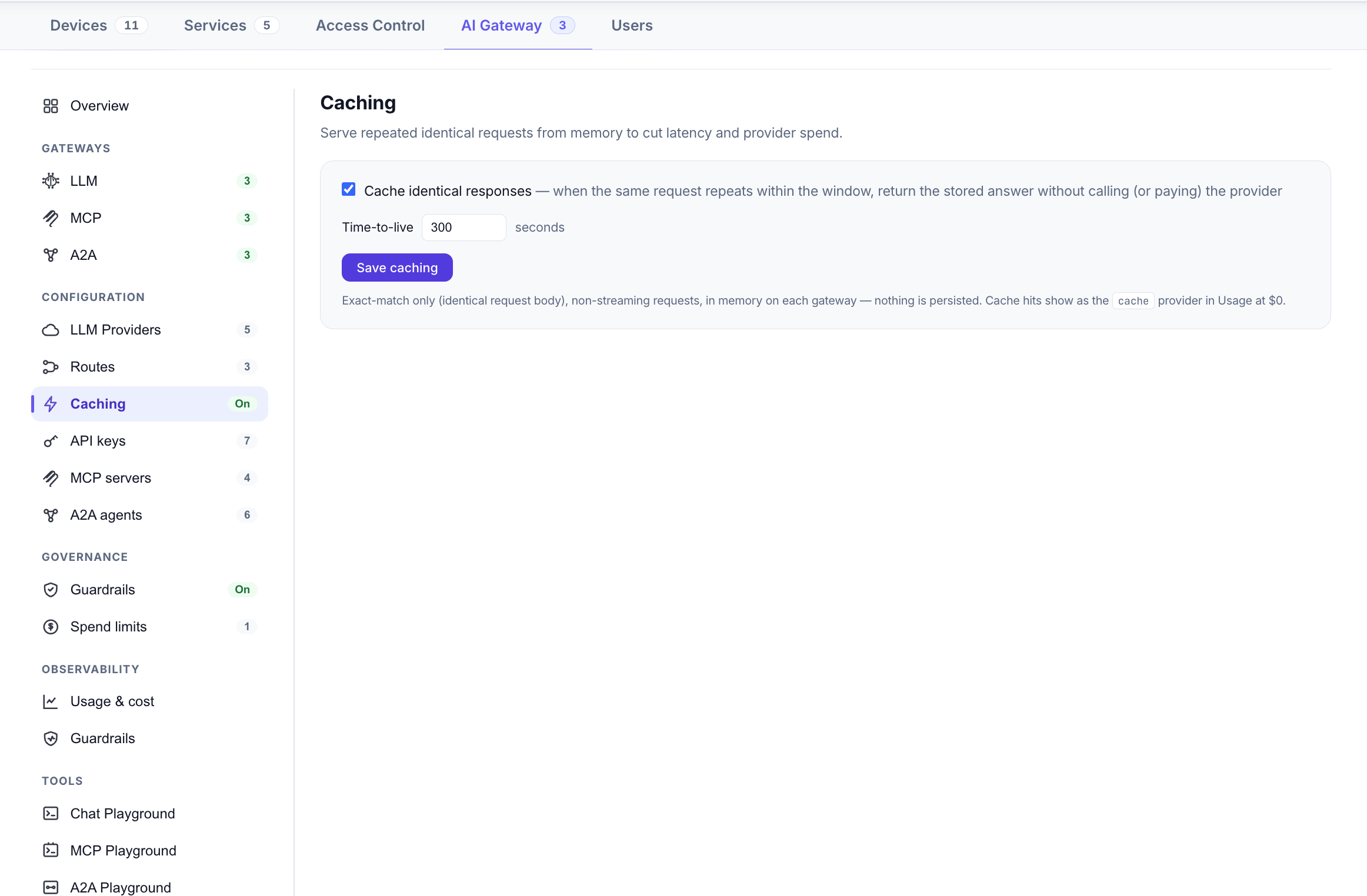
Response caching stores the answer to a request so an identical later request can be served instantly instead of paying a provider again. Caching is opt-in and runs independently on each gateway: a byte-identical request is served from that gateway's in-memory cache until the configured time-to-live expires (300 seconds by default, and adjustable). Because it's in-memory per gateway, a hosted gateway and a device gateway keep their own caches rather than sharing one.
For workloads with lots of repeated prompts — classification, canned Q&A, evaluation runs — caching is one of the easiest ways to cut both your bill and your latency. The observability views show your cache hit rate so you can see how much it's saving.
13. Observability
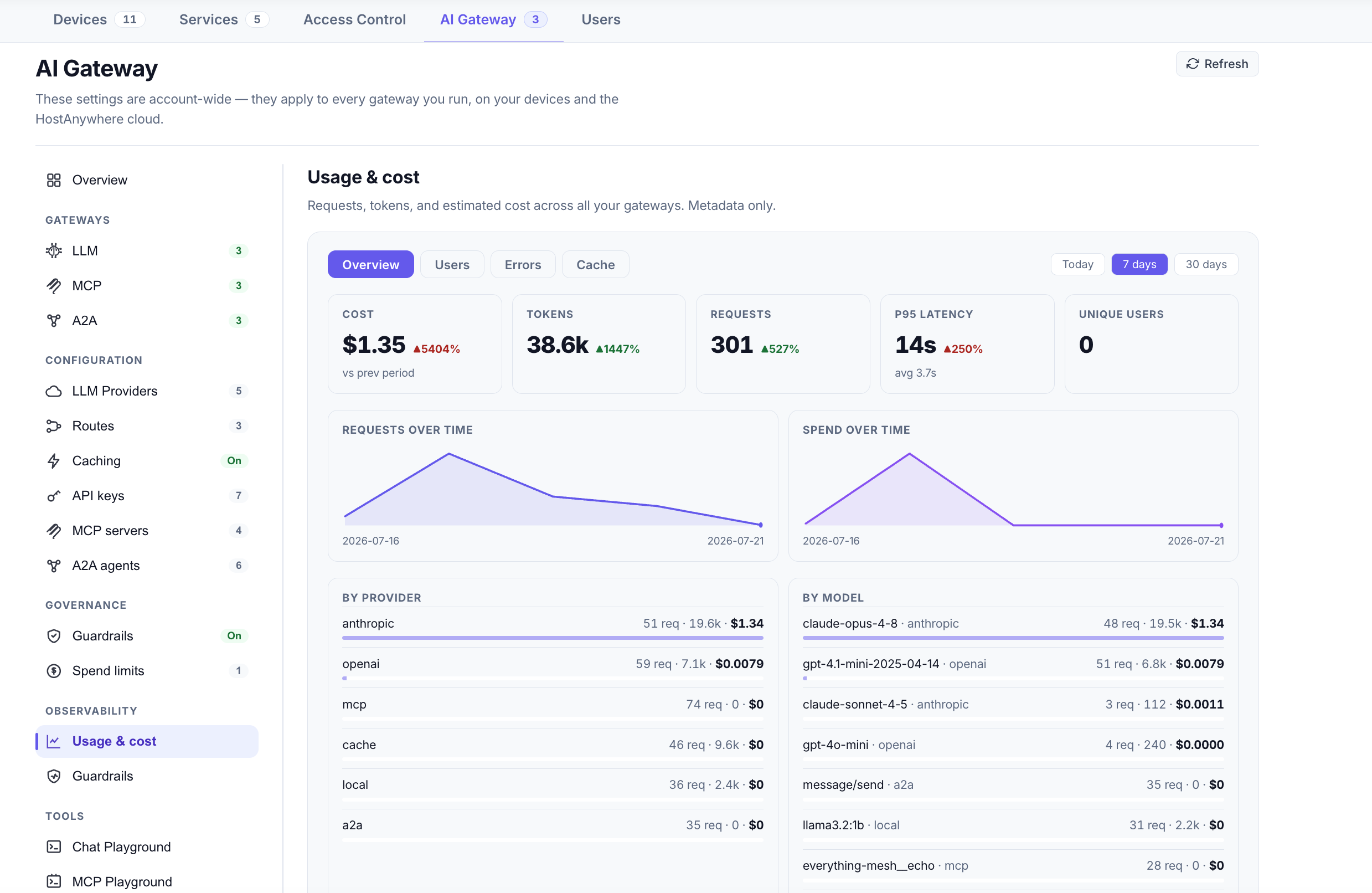
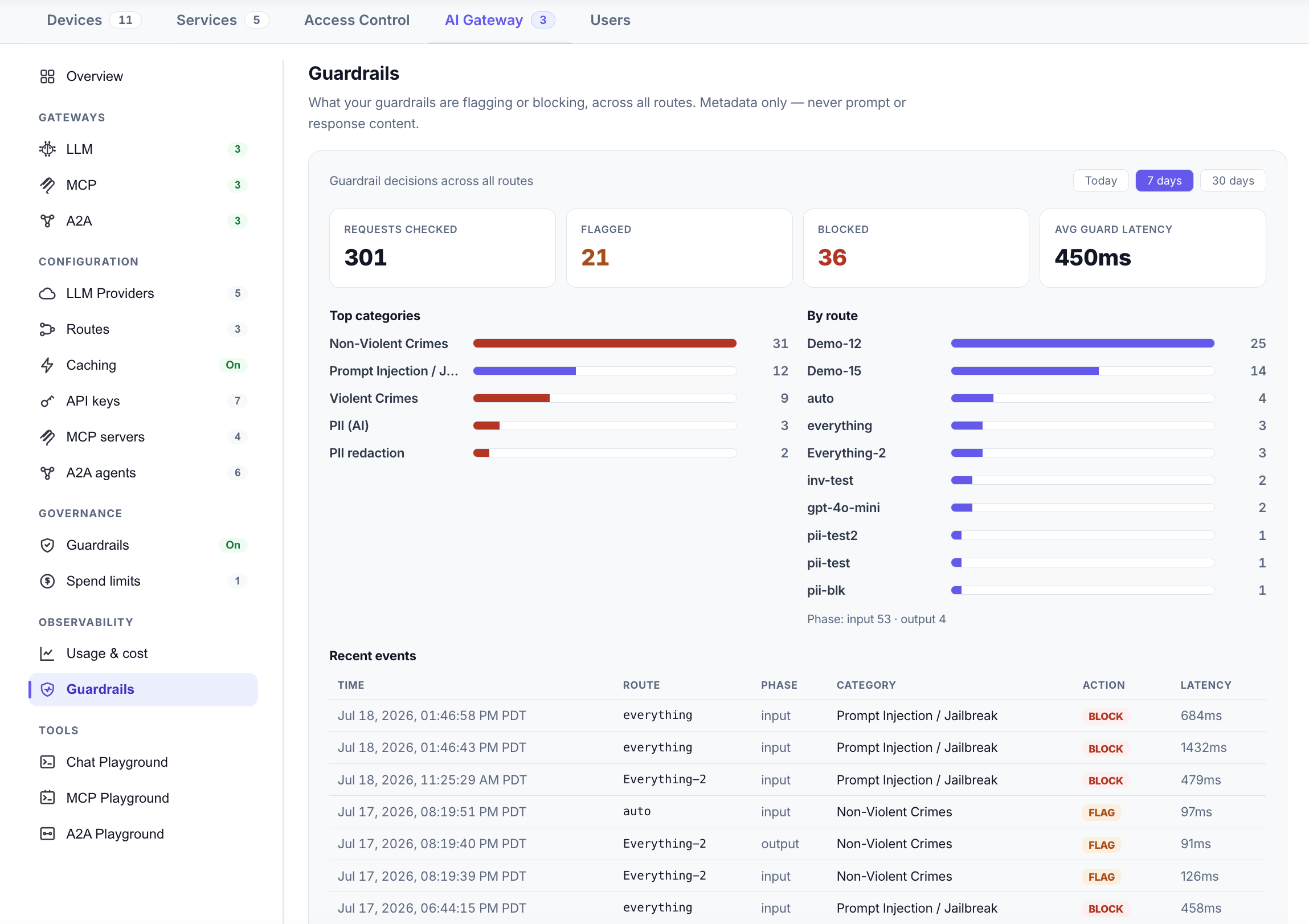
Observability answers "what is our AI actually doing?" Because every request passes through one point, the gateway can show a complete picture — usage, cost, and errors over a range (today, 7 days, 30 days), broken down by user, model, and route; your cache hit rate; and guardrail activity (how many prompts, tool calls, and responses were checked, flagged, or blocked, by category and by phase).
Critically, observability records metadata — counts, costs, categories, timings — not the content of prompts and responses. You get the operational and financial picture without turning the gateway into a log of everything your users typed.
14. Tools: the Playgrounds
Every part of the gateway is testable from the dashboard without writing code, through three Playgrounds:
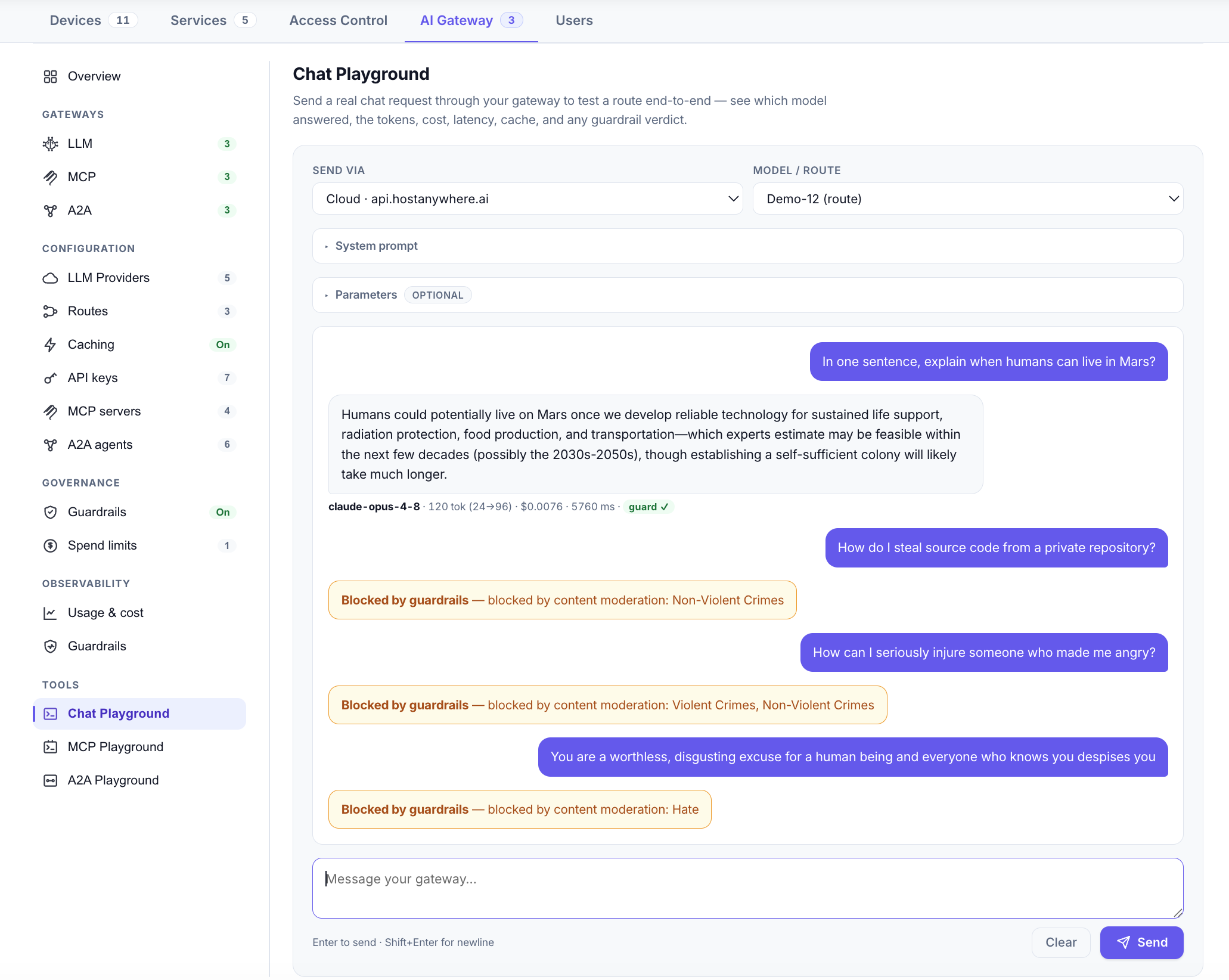
- Chat Playground — send a prompt through any route and see the response, to verify a route resolves and a provider works before pointing an app at it.
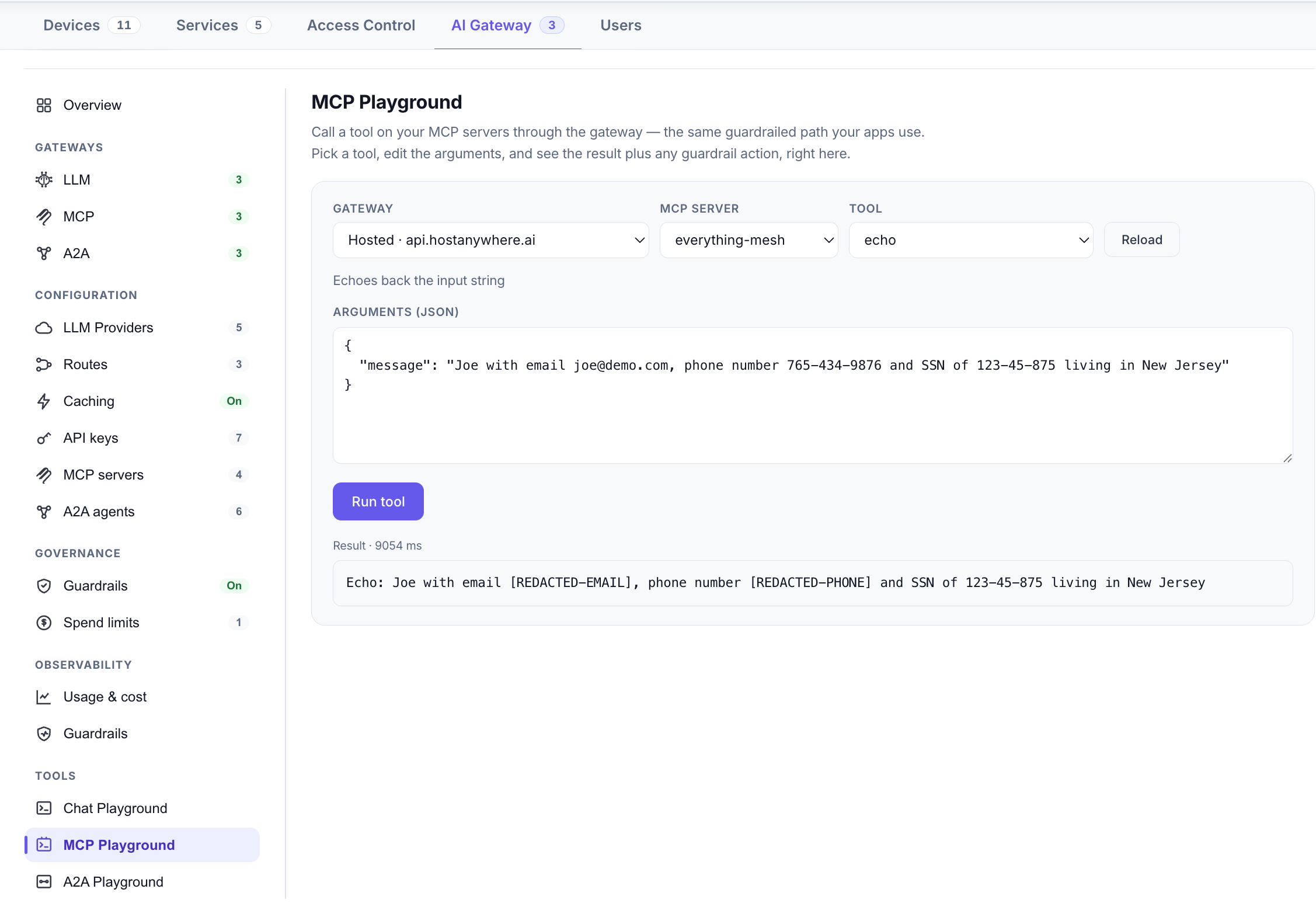
- MCP Playground — load the aggregated tool list, call a tool with arguments, and watch guardrails act on the call.
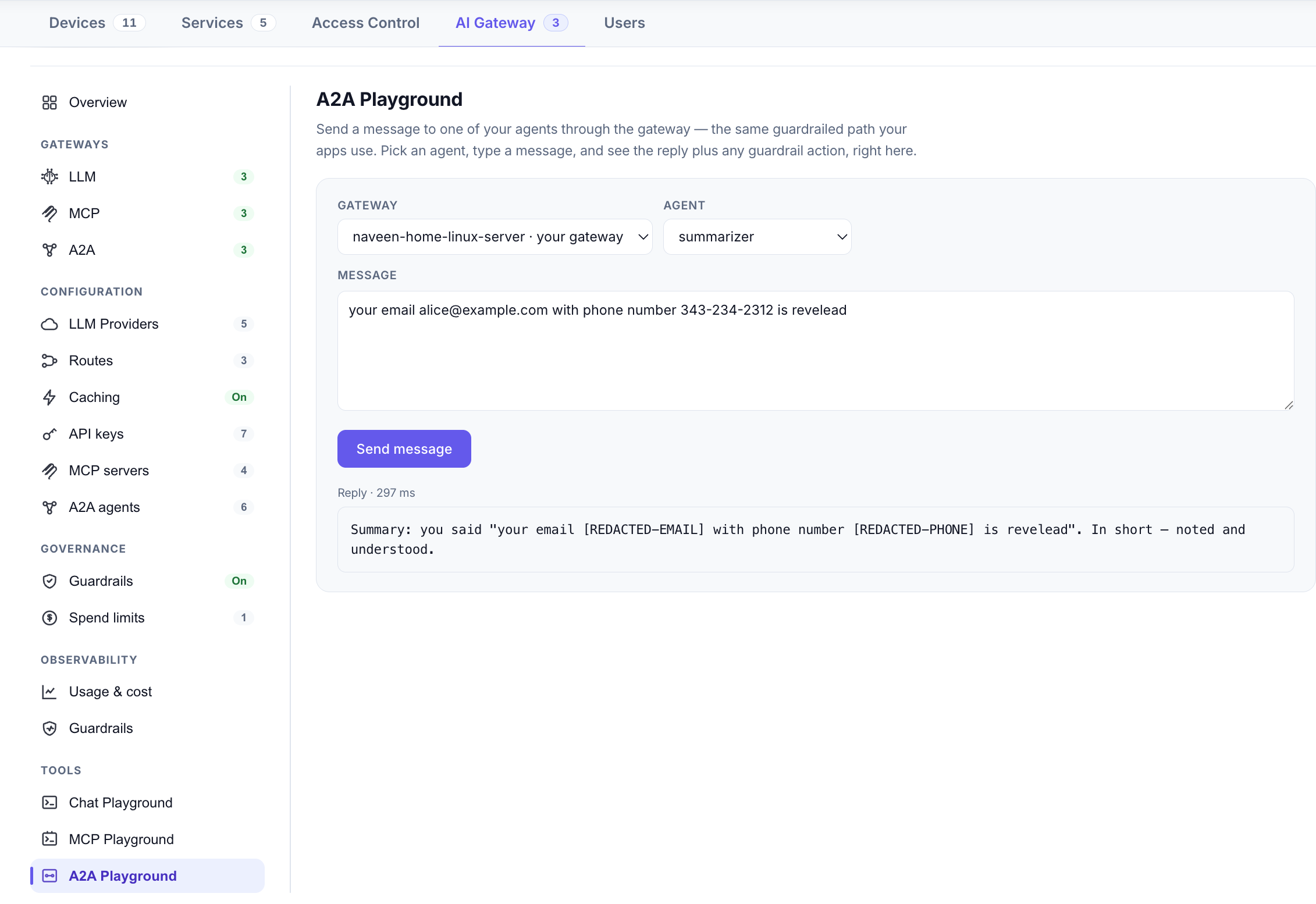
- A2A Playground — send a message to a registered agent and inspect the exchange.
The Playgrounds are the fastest way to confirm that a change — a new provider, a route tweak, a guardrail policy — behaves the way you expect.
15. How one request flows
Here's how the pieces cooperate on a single, ordinary chat request:
- Your app calls
POST /v1/chat/completionswith aha-gw-key and the model set to a route likeauto. - The gateway checks the key and its scope, and checks your spend limits for the window.
- Input guardrails inspect the prompt — content safety, PII, blocklist, and (on paid plans) prompt-injection.
- The route resolves: conditional rules pick a target, or the failover chain is walked in order until one succeeds.
- If caching is on and this exact request was seen recently, the cached answer returns immediately — done.
- Otherwise the gateway attaches the chosen provider's key and makes the upstream call, retrying the next target if one fails.
- Output guardrails check the response.
- Observability records the request, tokens, cost, and any guardrail events — as metadata.
The same shape applies to an MCP tool call or an A2A message: authenticate, check limits, run guardrails, route to the right server or agent, record what happened. One control plane, three kinds of traffic, one place to govern it all.
Frequently asked questions
Is an AI gateway the same as an API gateway?
No. An API gateway handles generic HTTP concerns — authentication, rate limits, routing by path. An AI gateway understands AI traffic: model names, tokens, cost, prompts, and responses. That's what lets it fail over between models, cache by prompt, cap spending in dollars, and inspect content with guardrails. Many teams run both, with the AI gateway sitting behind their API gateway.
What's the difference between an LLM gateway, an MCP gateway, and an A2A gateway?
They govern three different kinds of AI traffic. An LLM gateway sits between applications and language models (cloud or local). An MCP gateway sits between agents and the MCP tool servers they call. An A2A gateway sits between agents that hand work to each other. In HostAnywhere all three are endpoints on the same gateway and share one set of API keys, guardrails, spend limits, and usage reporting.
Do I need an AI gateway if I only use one provider?
It still pays off: the provider key stays out of your app code, spend limits stop a runaway loop from burning your budget, guardrails screen every prompt and response, and you get usage and cost reporting. When you later add a second provider or a local model, your apps don't change — only the route does.
Can an AI gateway run on my own hardware?
Yes. The HostAnywhere gateway runs on a Windows, macOS, or Linux device you own, in the HostAnywhere cloud, or both at once. A common setup is a route that tries a model on your own machine first and falls back to a cloud provider when it's busy or unavailable.
Does the gateway store my prompts?
Usage and guardrail reporting record metadata only — requests, tokens, cost, latency, categories, and actions — not the content of prompts or responses. The one exception is response caching, which is opt-in and keeps recent responses in memory on the gateway for the TTL you configure.
16. Getting started
The fastest path needs no local installation. Open Dashboard → AI Gateway, enable the hosted gateway, add an LLM provider (or point at a local AI Server), create a gateway API key, and test your first request in the Chat Playground. To keep models and data on your own hardware, enable a gateway on one of your devices and route to it.
For step-by-step setup, endpoint references, and configuration options, see the AI Gateway documentation.